News Update :
Showing posts with label Mobile Phone. Show all posts

Samsung Phone Password I Ttheihnghilh anih chuan

Penulis : Unknown on Saturday, 30 August 2014 | 22:11

Saturday, 30 August 2014

1. I phone contact leh thil pawimawh i backup phawt ang. Hei hi tih zeuh zeuh a tha phone chhiat thut te a     awm thei.
2. I phone battery direct in phawi pawp la i sim leh mmc i la chhuak ang.
3. Battery i vuah anga i phone i on ang.
4. Start mobile without simcard a rawn ti anga yes or allow in i kal tlang dawn nia
5. Phone a in load zawh ah he code hi i hmet dawn nia engmah space awm lovin. *2767*2878#
6.I phone automatic in a restart ang chumi hnu ah sim leh mmc i thun dawn nia
chuan i phone password chu alo in remove der tawh ang. Code hi i hmang a adiklo anih chuan hei hian i ti leh dawn nia.
*2767*3855#

He code hi samsung mobile SGH-J-150 and SGH-E-490 ah test ani tawh a model dang ah pawh hmantheih tura ngaih ani. He thil hian i phone password kha a remove ani tih hriattur
comments | | Read More...

Symbian hmangte tan a TEXT MESSAGE back up dan

File explorer sis i download ang..i explorer hmang chuan i phone memory (C:/) a MAIL FOLDER chu i copy a nga...i memory card(E:/) ah i duhna ber ah i paste leh ang..

Eng emaw vang a i phone restore a tul pawn i text message tha leh thlum tak tak ho kha chan lo in i kawl tha thei tawh ang.

Explore Download
comments | | Read More...

Mokia Themes Edit Na

I luh hunah colour chi hrang hrang kha i thlang ang a. Icon 2 ah khan i duh zawk i tick bawk ang a. I nokia screen resolution kha i thlang bawk ang. E.g Nokia x2 hi 240x320 a nia. Click here to theme edit

Chuan Background leh Screensaver tur kha i thlalâk nalh tih deuh i upload bawk ang a. I upload a len poh leh i theme kha a lian dawn a ni mai. I thlan fel hunah Create Theme tih kha i click ang a. Download na tur a lo lang tawh mai ang.

Sony Eriksson theme i siam duh chuan Sony Eriksson 240x320 screen emaw Sony Eriksson 176x229 screen hi click la. Simple leh Advance a awm kha. Advance ah chuan image upload tur kha size edit phawt an ngai a. A buaithlak a a changkang thung.
comments | | Read More...

ttpod Android

Awle tun tum ah chuan music player tha ttpod karawn fak vel dawn ani. Android ihmang ve a,ilei tirhin music player pawh an rawn dahsa ngei mai mahse eng teh ual an nilo, Google Play Music te,hman an hrehawm em em,marketah kal la music player thazual Poweramp music player angte chu lei angai bawksi.(Google play license check a awm avangin blackmart atang pawh download mahla awmzia a awm vaklo ang).Crack ve dawnla iphone pawh iroot silo,imamawh chu music player tha ttpod ani.
(Nia,application tha karawn fak luam thina achhanchu fak an phu em alawm,afree in an han siam a,keini takngial tan pawh malsawmna an ni zel anihhi.)
Le Download duh tan
ttpod v 6.4.2 (download)


ttpod that bik em em nate.....

ttpodmain.png1)visualisation
2)equaliser
3)Skins
4) auto sleep turn off
5)shake control&headset control
6) Album art, Lyrics
7)UI
8)stability,


Mp3 tag
mp3tag.pngttpod hian inbuild mp3 tag editor chak leh rang tak anei a.Arin tlak em em bawk. Ihla duh ah khan (theme azirin) han click vang vangla, info ah lutin i edit mai dawn nia. ttpod atanghian ihla title,album,track number,Genre,Comment te i edit theiha mahse album art erawh atheih loh.ttpod hian album art amahin adownload a,ihla play laikhan background ah pali thlengin alo tilanga heivanghian album art chu imamawh kher lo tihna anih chu.


Equaliser
ttpodequaliser.pngttpod hian equaliser tha em em mai anei a,Poweramp nen a ka tehkhin pawhin ttpod hi atha kati zawk,inbuild in 10 a awmsa a tin amaha in download bakah mahni pawn a download chawp zel theih a(tunah hian 112 ka nei mek).Download dawn pawhin equaliser set sa pakhat hi 1kb vel chauh ani a, 100 pawh minute chanve vel leka download mai theih ani.
Tin,heibakah hian custom (mahni tha tihdan ber) pawn siam chawp zung zung theih ani a,iduhleh iti thum anga iduhleh iti sin deuh anga,ithu thu ani e.
Heimai bakah hian Reverb leh Boost ala awm cheu a,Boost bikhi tlem kan type leh anga,Boost hnuaiah hian Base boost,Treble boost,Voltage limiter,virtualiser,channel balance a awm a hei ringat pawhhi ahlu ani.


lyrics
Ka sawihmaih theihloh chu ttpod hi music player chauh anilo a,lyrics player ani nghal a,hla ipaly lai khan mobile data emaw,wifi han conect la album art leh lyrics adownload nghal a,album art hi chu thlalak pali vel 50kb vel theuh a download a,lyrics hi chu 2kb atanga 10kb vel thleng(ahla seidan azirin)a download a,alianlo ani......ti ro,.Tunah hian hla 396 kanei meka avaia data lyrics leh album art hi 6mb vel ani.Application dang nena khaikhin in data pawh aheklo em em bawk kati ani.
Album art leh lyrics download dik tur chuan ahla title leh asatu kha adik angai a tag edit dik deuh erawh angai ve a. Mahse diklo pawh nise i play laikha ahnuai lam atang khan han drag chho zeuhla mahni pawn search leh download mai theih ani bawk.
Tin,lyrics hi hla iplay laikhan aflow dawn a khami flow kha (adik tlangpuia) adiklo a awm ve zeuh zeuh a,mahnia adjust maithei ani a,aphei zawng te,a color te leh afont size thlengin awlsam takleh mahni duhdan a siam / edit mai tur ani.

Sleep mode
Keini ang zan mutdawna music ngauthla thin tana thil tangkai em em mai,sleep mode hi ttpod ah pawhhian a awmve vek bawk a. Menu hmetin sleepmode ah kala number dahluh maigur ani. 30 ifah chuan minute 30 hnuah amahin ain off mai dawn ani.Hla play lai mutthilhsan pawhin amahin a in off a,batary heklo takin zantin a awi mu thei che anih chu.

Theme
ttpod hian theme angah em em a,atlangpuiin theme pakhat hi 500kb vel chauh ani a mahni duhzawng download zung zung mai tur ani. Tin thrme bakah hian background hi a awm hran leha,mahni thlalak emaw duh duh hman mai theih ani.
Tin,Splash image hi,idahloh chuan amahin adownload a duh duh adah mai a,splash a mahni thlalak dahdan chu Storage/sdcard0/splash ah kalla splash tih folder chhungah khan ithlalak duh duh pakhat dahla,rename rawh ahmingah splash iti ang.Ithlalak kha jpg emaw png nibawk se kha kha splash ah ahmang nghal dawn ani.


ttpodtheme.pngLock screen & mini lyrics
ttpod hian lock screen nalh tak anei a,menu=>setting=>logscreen kha on mai tur ani
Mini lyrics hichu ttpod a hla iplay anih chuan lyrics application dang pawh hawngla, alyrics bik chauh kha iphone screen ah khan alolang ve zel dawn ani.

Playlist
Playlist chu kan hretheuh anga,music player ah chuan a awm deuh vek a,ttpod ah pawhhian a awm a,mahse chutianga han fak vak tur anilo a,music player dang ang tho ani. Mahse my favourate a awm a ihla list ah khan asir a love sign kha click keuha add mai tur ani.
Kasawi vek senglo ang.Search te bakah adang tamtak a awma karawn sawi zawng hichu intoduction tlem chauh ani.mahnia hman a belhchian ve mai chi ani e....
comments | | Read More...

Phone aṭanga torrent file download dan

UC Browser aṭangin:
Kan hriat ṭheuh angin torrent site-a mi download tur chuan uTorrent, BitTorrent, BitCommet etc. hman a ngai a; IDM aṭanng pawhin a download theih tih chu kan hre tawh bawk a. Mahse, he'ngte hi computer aṭanga download chi vek an ni.

Tunṭumah ve thung chuan Mobile Phone (UC Browser) aṭanga download dan ka'n sawi ve thung dawn a ni. Tam tak chuan in hre tawhin ka ring a, ṭangkaipui an awm takin ka rawn tarlang ve hrim hrim ang e.


A hmasain, kan download duh torrent file kha download phawt emaw, a link emaw kha copy a ngai a. Entirnan: Torrent site-a mi Fifa 14 Crack hi lo download duh ta ila, hemi download theihna torrent file kha download hmasak emaw, a torrent file link [main site link ni loin hetianga a tawpa .torrent awm hi http://torcache.net/torrent/C9B6BE80853B0519D812FE64A18499E4CC875638/%5Bkickass.to%5Dfifa.14.crack.v5.final.3dm.torrent] emaw copy-in www.zbigz.com kal tur a ni. Chuan, link paste-naah paste-in emaw, 'Browse' aṭangin torrent file upload-in emaw 'Go' tih kha click tur a ni. A in-upload zawh hunah a file tak kha (torrent-a mi kha www.zbigz.com ah) a in-upload tan ve chauh ang (upload Caching Speed hi 2.xx Mbs velin a kal tlangpui) a, Caching a zawh hunah a hnuaia a file hrang hrang kha i en ang. 100% a tlin chuan a sirah download button a rawn lang ang a, a download theih tawh tihna a ni. Tichuan, a file ho kha a mal tetein download mai tur a ni a, phone a zirin a mal tetein a inṭhendarh lo thei bawk. Khami site aṭanga delete hma loh chuan download kha a pause-in a resume reng theih a ni.


Hriat tur pawimawh chu torrent site zawng zawngah kan sawi tak a torrent file (torrent disc te pawh an tiin ka hria) kha download theihin a awm vek lo a; a ṭhenah chuan 'Downlod torrent' tih te, 'Get torrent file' tihte'n a awm a, chuta tang chuan torrent file chu download mai tur a ni.


Tin, www.zbigz.com ah hian premium account nei lo tan chuan 1GB aia lian chu a upload theih loh a, file thar dah dawn chuan a hlui kha paih hmasak a tha. A chhan chu caching speed kha a timuang vek thei a, a kal theih loh phah hial thei bawk. Torrent file upload zawh hnua caching speed emaw, a file upload percent emaw a kal thei lo a nih chuan, a page kha reload emaw, a file hming kha click-a reload mai tur a ni. Hei hi UC Browser atang ka test tawh a, 100% a work a ni. Browser dang aṭang pawhin torrent file download theihna emaw, a link lak theihna a awm chuan theih tho turah ka ngai.
Screen shoot - 1

Screen Shoot - 2
 Screen Shoot - 3
comments | | Read More...

Java Phone in Antivirus a mamawh chiah em?


Java user tamtak ten antivirus anlo request ta jeuh2 mai, hriatloh na hian min ti min tibuai thui thei khwp mai. Kei ngei pwh hi X2-01 ka hman tirh kha cuan antivirus ka xwg nasa ve thin ania,, hei hi han chhiar leh xuai teh ang u..

JAVA based platform re2 hi a feature hi a tenau em2 a (smartphone te nen a tehkhin cuan), application tha tak2 pawh kan hmang ve theilo thin. Mahse a thatna lai a awm ve tlat.
Java proggramme hi language pakhat 'JAVA Language' hmang a duan vek ani a. Language dang mil a siam anilo.

Application tenau te2 chu a hmang/install ve theih ngei mai, mahse background a ...run thei tur application programme chu java language hmang chuan a xiah ve theih loh. Tin,java device re2 hi a memory(RAM) a limit em2 a, Sensitive parts lai khawih buai thei tur software duan theih anilo hrim2 bawk. A awmzia chu java phone khawihbuai thei tur software(virus/malware/spyware) a siam ve theihloh tihna a nih chu!. Eng application pawh run la, power button i hmeh a i exit khan an hnathawh zawng2 a tawp tel vek thin.
Antivirus: antivirus te hi heng virus (malware/spyware..etc) te paihbo thei tur application ani a, i file zawng2 te, i device pumpui a lut chhuak vek a scan thei tur a duan ani. Mahse eng programme mah in java device a sensitive part deuh a khwih theih si loh chuan antivirus pawh chu engmahlo mai alo ni ta..

I phone operation pangai a i delete theihloh file i nei a nih chuan, BluFTP hmang in i delete thin dawn nia..
Mahse, hacker/Programmer te chu anla beidawg mai biklo aniang, blutooth hack software tamtak a chhuak leh ta. Mahse heng application te pwh hian an tihbuai tur device ah permission a dil a, am phalna thlap a an phone an access angai veleh tho ani. Blutooth Hack software hrang2 te hmang hian midang phone i pair a nih chuan, an phone chu i control thui thei hle ang, key press, media control,dial, send sms, lock....etc..sms chhiar sak thleng in midang phone ami a khawih ruk theih ve thin
.
Mahse computer, virus in a tihbuai twh ah i connect a nih chuan i phone ah khan file eng2 emw alo insiam anga (hidden in) cu cuan i phone a timuang anga, folder thenkhat phei cu i hwn rual in i phone a in off dyh xel ang. Mahse cu2 i conputer virus vang xwk kha ani..

Tin phone muang thenkhat hi chu File tamlutuk a memory full ltk vang te, Theme millo pui hman vang te, theme lian ltk leh graphic sang ltk hman te hian phone a ti muang thin.

I phone kha java a nih leh nih loh i hriat loh chuan comment ah lo sawi mai rawh..
comments | | Read More...

Android OS ah phone root bik a thatnate

I phone kha i root chuan apps hman theih loh a awm tawh mang lovang, i apps duh apiang a free tawh phawt chu i hmang vek thei tawh ang.I root hma kha chuan i phone kha a lo changkan ve deuh loh phei chuan apps lian ho chu a hmang ve thei lo nual ang, chu2 i phone i root chuan i chingfel nghal phawt. 
Phone i lei tirh a apps a chhawmsa tangkai em2 lo ho kha i root chuan i paih vek thei ang, android ah chuan engkim kha apps vek a ni a, camera software te ngei pawh i change vek thei chutianga ti tur atan chuan i root hmasak phawt a ngai thung. Apps siksawi na atan a tha a nih ber mai chu! 
I phone internal memory (RAM) a te bawk si, i apps lak a piang kha phone memory ah ala install zui! Internet / Processing a muang em2 mai a. Chu2 i root chuan i apps lak thar ho kha sd card ah i move lut vek thei, RAM 128 chauh tan phei chuan root ngei2 chi! 
I phone chhunga mi home, menu, handwriting, theme zawng2 kha i duh2 danin i design thei tawh ang, mahni te kha theme ah han indah vel la, dangdai ve riau nia! 
Programming zir i duh chuan i phone root phawt mai teh! I phone ah khan programming apps lampang ho chi install a, i zirchian ve theih nan aw, backtract etc hman dan i zir duh chuan i root hmasak a ngai a nih chu! 
I phone internal memory (RAM) kha i root chuan i ti lian thei bawk, i duhdan taka lian size khan i extent vek thei, 128, 256, 512,1024, 2048 i duh tiatin i ti lian thei e. 
Hriat ve mai mai atan Linux hi i root loh chuan ankhuakhirh hneh angreng a, phal loh a tam lutuk tlat! Heng ho laka talchhuah pawh a chakawm lawm le. 
Hriat ve atan RAM lian a piang hi a process chak tih hriat a tha, Computer pawh lei dawn la a RAM lian chu thlan hmasak ah i nei dawn nia.

NOTE: ROOT hi software hack a nih a vangin i root hnuah a software buai mahse warranty ah an khawih sak tawh lovang che, root fuh loh theih lutuk a nia, a chingpen vek thei tih hriat a tha, engmah chinchang i man ve deuh loh chuan pawng tih mai chi a ni lo. zip file tha tak hi hmuh tur avang angreng hle bawk. ( I root a, i phone in chian lohna a neih chuan mawh ka phur lovang. )
comments | | Read More...

Android Phone atanga Photo Delete Tawh Recover dan

ANDROID THAT BIKNA:
Thlalak i duh em em te kha i delete palh ta hlauh mai a, i ui angreng khawp mai a, Android ah chuan a bo mai hleinem!
  • Hetiang thil a in back up vak thin vang hi a nia, sd card pawh a full hma em2 bik! I sd card a Android tih folder kha i lo delete thin palh ang tih ka hlauhpui che, khatah khan a in backup thin a nia aw! I lo delete thin a nih pawhin tunah chuan i hretawh a, ti tawh lo la aw (le!! a behbawmah kan kual mah2 thin e, inhrilhfiah tum luat vang pawh a ni ve ang chu!)
I thlalak delete tawh chu engtin ge i en ang le? I sd card ah lut la, Android > data > com.cooliris.media > cache > hires-image-cache ah khan i thlalak chu a awm ngei ka beisei. ES File Explorer download la, chumi hmang chuan a tawpa cache tih kha .jpg in rename keuh la o. I hriat chian leh zual duh chuan i memory card (mmc) kha hmundangah vuah la, khang ho kha rename teh! A tawpah khan .jpg han belh keuh la, thlalakah a chang a ni mai...!!! Thildang pawh a in back up teuh a nia,
comments | | Read More...

Samsung Secret Codes

Software version: *#9999#
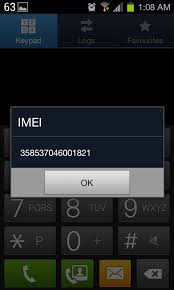
IMEI number: *#06#
Serial number: *#0001#
Battery status- Memory capacity : *#9998*246#
Debug screen: *#9998*324# - *#8999*324#
LCD kontrast: *#9998*523#
Vibration test: *#9998*842# - *#8999*842#
Alarm beeper - Ringtone test : *#9998*289# - *#8999*289#
Smiley: *#9125#
Software version: *#0837#
Display contrast: *#0523# - *#8999*523#
Battery info: *#0228# or *#8999*228#
Display storage capacity: *#8999*636#
Display SIM card information: *#8999*778#
Show date and alarm clock: *#8999*782#
The display during warning: *#8999*786#
Samsung hardware version: *#8999*837#
Show network information: *#8999*638#
Display received channel number and received intensity: *#8999*9266#

*#1111# S/W Version
*#1234# Firmware Version
*#2222# H/W Version
*#8999*8376263# All Versions Together
*#8999*8378# Test Menu
*#4777*8665# GPSR Tool
*#8999*523# LCD Brightness
*#8999*377# Error LOG Menu
*#8999*327# EEP Menu
*#8999*667# Debug Mode
*#92782# PhoneModel (Wap)
#*5737425# JAVA Mode
*#2255# Call List
*#232337# Bluetooth MAC Adress
*#5282837# Java Version

Type in *#0000# on a Samsung A300 to reset the language
Master reset(unlock) #*7337# (for the new samsungs E700 x600 but not E710)
Samsung E700 type *#2255# to show secret call log (not tested)
Samsung A300, A800 phone unlock enter this *2767*637#
Samsung V200, S100, S300 phone unlock : *2767*782257378#

#*4773# Incremental Redundancy
#*7785# Reset wakeup & RTK timer cariables/variables
#*7200# Tone Generator Mute
#*3888# BLUETOOTH Test mode
#*7828# Task screen
#*#8377466# S/W Version & H/W Version
#*2562# Restarts Phone
#*2565# No Blocking? General Defense.
#*3353# General Defense, Code Erased.
#*3837# Phone Hangs on White screen.
#*3849# Restarts Phone
#*7337# Restarts Phone (Resets Wap Settings)
#*2886# AutoAnswer ON/OFF
#*7288# GPRS Detached/Attached
#*7287# GPRS Attached
#*7666# White Screen
#*7693# Sleep Deactivate/Activate
#*2286# Databattery
#*2527# GPRS switching set to (Class 4, 8, 9, 10)
#*2679# Copycat feature Activa/Deactivate
#*3940# External looptest 9600 bps
#*4263# Handsfree mode Activate/Deactivate
#*2558# Time ON
#*3941# External looptest 115200 bps
#*5176# L1 Sleep
#*7462# SIM Phase
#*7983# Voltage/Freq
#*7986# Voltage
#*8466# Old Time
#*2255# Call Failed
#*5376# DELETE ALL SMS!!!!
#*6837# Official Software Version: (0003000016000702)
#*2337# Permanent Registration Beep
#*2474# Charging Duration
#*2834# Audio Path (Handsfree)
#*3270# DCS Support Activate/Deactivate
#*3282# Data Activate/Deactivate
#*3476# EGSM Activate/Deactivate
#*3676# FORMAT FLASH VOLUME!!!
#*4760# GSM Activate/Deactivate
#*4864# White Screen
#*7326# Accessory
#*7683# Sleep variable
#*3797# Blinks 3D030300 in RED
#*7372# Resetting the time to DPB variables
#*3273# EGPRS multislot (Class 4, 8, 9, 10)
#*7722# RLC bitmap compression Activate/Deactivate
#*2351# Blinks 1347E201 in RED
#*2775# Switch to 2 inner speaker
#*7878# FirstStartup (0=NO, 1=YES)
#*3838# Blinks 3D030300 in RED
#*2077# GPRS Switch
#*2027# GPRS Switch
#*0227# GPRS Switch
#*0277# GPRS Switch
#*22671# AMR REC START
#*22672# Stop AMR REC (File name: /a/multimedia/sounds/voice list/ENGMODE.amr)
#*22673# Pause REC
#*22674# Resume REC
#*22675# AMR Playback
#*22676# AMR Stop Play
#*22677# Pause Play
#*22678# Resume Play
#*77261# PCM Rec Req
#*77262# Stop PCM Rec
#*77263# PCM Playback
#*77264# PCM Stop Play
#*22679# AMR Get Time
*#8999*364# Watchdog ON/OFF
*#8999*427# WATCHDOG signal route setup
*2767*3855# = Full Reset (Caution every stored data will be deleted.)
*2767*2878# = Custom Reset
*2767*927# = Wap Reset
*2767*226372# = Camera Reset (deletes photos)
*2767*688# Reset Mobile TV
#7263867# = RAM Dump (On or Off)

*2767*49927# = Germany WAP Settings
*2767*44927# = UK WAP Settings
*2767*31927# = Netherlands WAP Settings
*2767*420927# = Czech WAP Settings
*2767*43927# = Austria WAP Settings
*2767*39927# = Italy WAP Settings
*2767*33927# = France WAP Settings
*2767*351927# = Portugal WAP Settings
*2767*34927# = Spain WAP Settings
*2767*46927# = Sweden WAP Settings
*2767*380927# = Ukraine WAP Settings
*2767*7927# = Russia WAP Settings
*2767*30927# = GREECE WAP Settings
*2767*73738927# = WAP Settings Reset
*2767*49667# = Germany MMS Settings
*2767*44667# = UK MMS Settings
*2767*31667# = Netherlands MMS Settings
*2767*420667# = Czech MMS Settings
*2767*43667# = Austria MMS Settings
*2767*39667# = Italy MMS Settings
*2767*33667# = France MMS Settings
*2767*351667# = Portugal MMS Settings
*2767*34667# = Spain MMS Settings
*2767*46667# = Sweden MMS Settings
*2767*380667# = Ukraine MMS Settings
*2767*7667#. = Russia MMS Settings
*2767*30667# = GREECE MMS Settings

*#7465625# = Check the phone lock status
*7465625*638*Code# = Enables Network lock
#7465625*638*Code# = Disables Network lock
*7465625*782*Code# = Enables Subset lock
#7465625*782*Code# = Disables Subset lock
*7465625*77*Code# = Enables SP lock
#7465625*77*Code# = Disables SP lock
*7465625*27*Code# = Enables CP lock
#7465625*27*Code# = Disables CP lock
*7465625*746*Code# = Enables SIM lock
#7465625*746*Code# = Disables SIM lock
*7465625*228# = Activa lock ON
#7465625*228# = Activa lock OFF
*7465625*28638# = Auto Network lock ON
#7465625*28638# = Auto Network lock OFF
*7465625*28782# = Auto subset lock ON
#7465625*28782# = Auto subset lock OFF
*7465625*2877# = Auto SP lock ON
#7465625*2877# = Auto SP lock OFF
*7465625*2827# = Auto CP lock ON
#7465625*2827# = Auto CP lock OFF
*7465625*28746# = Auto SIM lock ON
#7465625*28746# = Auto SIM lock OFF

Type *#9998*627837793# Go to the 'my parameters' and there you will find new menu where you can unlock phone.(not tested-for samsung C100)
To unlock a Samsung turn the phone off take the sim card and type the following code *#pw+15853649247w# .
Java status code: #*53696# (Samsung X600)

If you want to unlock your phone put a sim from another company then type *#9998*3323# it will reset your phone. Push exit and then push 7, it will reset again. Put your other sim in and it will say sim lock, type in 00000000 then it should be unlocked. Type in *0141# then the green call batton and it's unlocked to all networks. This code may not work on the older phones and some of the newer phones. If it doesn't work you will have to reset your phone without a sim in it by typing *#2767*2878# or *#9998*3855# (not tested)
comments | | Read More...

Nokia Secret Codes

On the main screen type
*#06# for checking the IMEI (International Mobile Equipment Identity).
*#7780# reset to factory settings.
*#67705646# This will clear the LCD display(operator logo).
*#0000# To view software version.
*#2820# Bluetooth device address.
*#746025625# Sim clock allowed status.
*#62209526# - Display the MAC address of the WLAN adapter. This is available only in the newer devices that supports WLAN like N80
#pw+1234567890+1# Shows if sim have restrictions.

*#92702689# - takes you to a secret menu where you may find some of the information below:
1. Displays Serial Number.
2. Displays the Month and Year of Manufacture
3. Displays (if there) the date where the phone was purchased (MMYY)
4. Displays the date of the last repair - if found (0000)
5. Shows life timer of phone (time passes since last start)

*#3370# - Enhanced Full Rate Codec (EFR) activation. Increase signal strength, better signal reception. It also help if u want to use GPRS and the service is not responding or too slow. Phone battery will drain faster though.
*#3370* - (EFR) deactivation. Phone will automatically restart. Increase battery life by 30% because phone receives less signal from network.
*#4720# - Half Rate Codec activation.
*#4720* - Half Rate Codec deactivation. The phone will automatically restart

If you forgot wallet code for Nokia S60 phone, use this code reset: *#7370925538#
Note, your data in the wallet will be erased. Phone will ask you the lock code. Default lock code is: 12345

Press *#3925538# to delete the contents and code of wallet.

*#7328748263373738# resets security code.
Default security code is 12345

Unlock service provider: Insert sim, turn phone on and press vol up(arrow keys) for 3 seconds, should say pin code. Press C,then press * message should flash, press * again and 04*pin*pin*pin#

Change closed caller group (settings >security settings>user groups) to 00000 and ure phone will sound the message tone when you are near a radar speed trap. Setting it to 500 will cause your phone 2 set off security alarms at shop exits, gr8 for practical jokes! (works with some of the Nokia phones.)

Press and hold "0" on the main screen to open wap browser.
comments | | Read More...

Nokia E71 Menu / Home Screen

Menu

Select Menu. The menu is a starting point from which you can open all applications in the device or on a memory card. The menu contains applications and folders, which are groups of similar applications. All applications you install in the device yourself are by default saved in the Installations folder. To open an application, scroll to it, and press the scroll key. To view the applications in a list, select Options > Change
Menu view > List. To return to the grid view, select Options > Change Menu view > Grid. To view the memory consumption of different applications and data stored on the device or memory card and to check
the amount of free memory, select Options > Memory details. To create a new folder, select Options > New folder. To rename a new folder, select Options > Rename. To rearrange the folder, scroll to the application you want to move, and select Options > Move. A check mark is placed beside the application. Scroll to a new location, and select OK. To move an application to a different folder, scroll to the application you want to move, and select Options > Move to folder, the new folder, and OK. To download applications from the web, select Options > Download applications. To switch between several open applications, press and hold
the home key. Select an application, and press the scroll key to switch to it. Leaving applications running in the background increases the demand on battery power and reduces the battery life.

Home screen

From the home screen you can quickly access features thatyou use the most, and see at a glance any missed calls or newmessages.


You can define two separate home screens for different purposes, such as one screen to show your business e-mail and notifications, and another to show your personal e-mail. This way, you do not have to see business-related messages outside office hours
comments | | Read More...

Blog Archive

 
Design Template by Ell Cee Renthlei | Support by creating website | Powered by Blogger